X-Mouse Button Control (darmowy)

wcpicker

Bardzo aktywny
Zasłużony
Dołączył
23 Grudnia 2012
Posty
957
Reakcje/Polubienia
121
Miasto
Łódzkie
3199.jpg

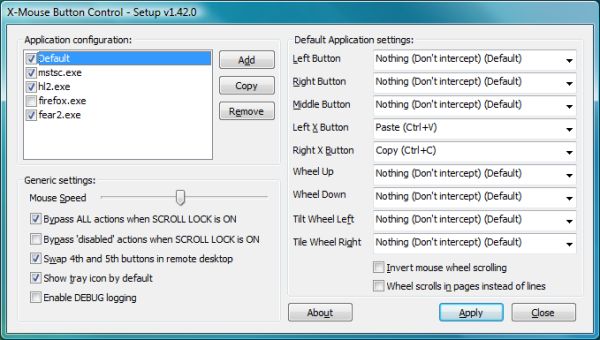
X-Mouse Button Control - darmowy program który pomoże dostosować mysz komputerową do własnych potrzeb. Często mamy wiele przycisków, których nigdy nie używamy, gdyż akcje przypisane do nich są dla nas nieprzydatne. Akcje te ustawiane są domyślnie przez sterowniki myszy i niestety nie mamy możliwości ich edycji używając narzędzi wbudowanych do system Windows. Jednak tutaj z pomocą przychodzi nam X-Mouse Button Control.

Aplikacja umożliwia samodzielne przydzielenie akcji dla każdego z przycisków myszy. Możliwości działań przycisków mamy do wyboru bardzo wiele. Są to takie zdarzenia jak dwuklik, zwiększenie/zmniejszenie głośności, włączanie/zatrzymywanie/przełączanie muzyki, minimalizacja/maksymalizacja okna, kopiowanie, wklejanie, otworzenie wybranego programu oraz wiele innych. Akcje, które ustawimy, będą obowiązywać dla całego systemu jako ustawienia domyślne.

Możemy także stworzyć wyjątki dla wybranych programów, aby w nich przyciski myszy znaczyły coś innego, np. wciśnięcie rolki domyślnie możemy ustawić na dwuklik, a w przeglądarce na tryb płynnego przewijania strony.

Kolejna możliwość to ustawienie kilku różnych konfiguracji określanych w programie jako "warstwy", co pozwala na dostosowanie myszy dla kilku osób i łatwe przełączanie między ustawieniami. Dzięki tym wszystkim opcjom możliwości konfiguracji są praktycznie nieograniczone.
info: programosy.pl

X-Mouse Button Control 2.8

Fixed slow simulated keystrokes and mouse clicks when assigned to the scroll wheel (associated with the scroll throttling introduced in v2.6 (#186)
Fixed issue causing repeat and sticky repeat sim keys to repeat far too quickly and too many get pushed into the new threaded input queue.
Fixed simulated keystroke {HOLD:x} function when used in combination with mouse buttons eg {LMB}
Added up/down buttons to re-order the profile list. Also added import and export buttons.
Fixed crash when log folder or settings folder can not be found.
Added ability to switch primary and secondary mouse buttons per application profile.
Added option to force layer button actions to revert to layer one rather than the previous layer.
Fixed bug in new Windows 8.1 update that causes High DPI screens to get incorrect mouse coordinates.
Added ability to automatically transition to a specified layer when the layer changes.
Fixed issues with unicode text/keys for layer names, run application names, simulated keystrokes.
Fixed occasional crash in new SendInput thread and improved support for unicode keys
Fixed Bug in movement to scroll in Metro apps. Now all input is sent/simulated from a separate thread to prevent blocking. This means all simulated key "in another thread" options are redundant as every method sends from a separate thread!
Fixed bug that caused run application to fail silently on Vista and later.
Add option to check for new beta versions from release version (note: a beta version will always check for new beta's)
Add regular expression search for window titles, process names and class names - allows wildcard matching. Added ability to target regions (quadrants) in window specific profiles, allowing you to have multiple profiles for one window, depending where the cursor is (top left, bottom right etc.). Useful for full screen apps and touch screens where you can configure the touch (left click) differently for different areas.
Add ability to make window title specific profiles.
Add actions to dim/brighten the screen.
Program do pobrania:

Zaloguj lub Zarejestruj się aby zobaczyć!
Tłumaczenia:

Zaloguj lub Zarejestruj się aby zobaczyć!
 

fluid

super saiyajin...
Fąfel
Dołączył
4 Czerwiec 2013
Posty
7200
Reakcje/Polubienia
47

fluid

super saiyajin...
Fąfel
Dołączył
4 Czerwiec 2013
Posty
7200
Reakcje/Polubienia
47

fluid

super saiyajin...
Fąfel
Dołączył
4 Czerwiec 2013
Posty
7200
Reakcje/Polubienia
47

fluid

super saiyajin...
Fąfel
Dołączył
4 Czerwiec 2013
Posty
7200
Reakcje/Polubienia
47
X-Mouse Button Control 2.9
Fixed a bug choosing the best/closest English language at startup.
Fixed a bug with Run Application which didn't work when command line arguments were specified.
Added ability to {PRESS} and {RELEASE} keys specifically in a simulated key sequence (for non-during methods)
Fixed bug causing Scroll/Tilt saving round the wrong way round!
Fixed bug causing language setting to be lost after successful change.
Show the window mask on the setup screen for custom window profiles.
Fixed issues such as the wrong window showing when adding and editing window specific profiles.
Automatically backup settings file during installation (in case there are problems in the new version!)
Completely re-written settings file management. Using new XML parser which is many times faster.
Better support for Windows 10, including new mapping actions and fixes to scrolling ModernUI windows.
Fixed another bug in simulated keystrokes (always sent as unicode breaking some games and keys)
Fixed another crash when using the scroll wheel on a fresh install with the setup window open!
(Also #249) Added ability to ignore repeated scroll/tilt messages to make the scroll wheel behave more like a button.
Fixed keyboard tab order in layer key page.
Fixed Search Charms / Search Apps which were round the wrong ways.

X-Mouse Button Control 2.9.1

Fixed a bug causing the application title field not to work in custom window profiles.

X-Mouse Button Control 2.9.2

Fixed a bug causing the 'Always revert to Layer 1' option not working.


Zaloguj lub Zarejestruj się aby zobaczyć!
 

fluid

super saiyajin...
Fąfel
Dołączył
4 Czerwiec 2013
Posty
7200
Reakcje/Polubienia
47
X-Mouse Button Control 2.10

Use proper code signing certificate, not self signed certificate to improve security and trust.
Fixed bug switching (reverting) layers automatically.
Missing language translations for 'activating layer' tooltips.
Disable cancel button on update window when launching update.
Fixed small memory leak in application profiles.
After importing a profile, the apply button is not enabled.
Disable layer in does not save for anything other than the default profile.
Add ability to configure the number of layers to keep GUI clean when not using lot of layers.
Hotkeys for Next/Previous layer do not honour the layer disabled flag.
After wake from sleep (windows 7) XMBC does not work until it is restarted.
Hidden icon not shown on second instance.
Quadrant detection is broken (never enabled).
Run profile on mouse move in separate thread.
Add ability to return to last layer (simulated keystrokes {layer:last})
Problem with Windows 7 Snipping Tool and XMBC
Version detection not working properly in Windows 10 Jan Tech Preview
Switch to layer list needs natural sort.
Icon wrong after disable using scroll lock.
Simulated keys (repeat) slow in latest version(s).
Use natural sort for action list.
Cross-hair icon on Advanced window settings missing.
Export button should be disabled for default profile
When adjusting scroll pages/lines it locks out for a significant time.
Scrolling pages issue with chrome.
Problem with activate window when scrolling using SCROLL WINDOW or MOUSE WHEEL actions.
Added AutoUpdate to improve the update process in the future.
Problem in Chrome
Sticky repeat keys not released when changing layer
Added 5 more layers (max of 10 now) and a setting to skip layers when moving between them with next/previous

Zaloguj lub Zarejestruj się aby zobaczyć!
 

fluid

super saiyajin...
Fąfel
Dołączył
4 Czerwiec 2013
Posty
7200
Reakcje/Polubienia
47

fluid

super saiyajin...
Fąfel
Dołączył
4 Czerwiec 2013
Posty
7200
Reakcje/Polubienia
47

fluid

super saiyajin...
Fąfel
Dołączył
4 Czerwiec 2013
Posty
7200
Reakcje/Polubienia
47
X-Mouse Button Control 2.11

Re-factored code to fix DLL linkage and improve maintainability.
Fixed a bugs in the translation text for the simulated keystrokes dialog.
Fixed a deadlock in logging that can lock up XMBC (esp. is the setup window is enabled with debug logging turned on).
Added Magnifier Zoom In/Out actions which will open the magnifier tool if it is not already open!
Fixed an issue with simulated keystrokes in some games/applications which were not translated correctly on non-English keyboards
Fixed bug with stick lock axis and movement to scroll related to changes for DPI fixes (#319) Now XMBC runs in Per-Monitor DPI Awareness mode which should fix all DPI related issues (except the display will be a bit small on high DPI - that's too bad for now)
Volume OSD stops working after audio device is changed.
On non-96 DPI displays, the mouse-over does not hit the correct window marks
XMBC loads USEnglish even when US International is set
When scrolling with a custom scroll action, when window quadrants are enabled, sometimes scroll is leaked through
Fixed an issue saving/loading desktop icon positions if your computer or user name has spaces or other invalid characters in it.
Additional code to check portable mode is suitable and that XMBC can write to the folder.
Fixed issue scrolling Windows 10 Universal apps (like Edge)
Fixed issue in Windows 10 with Virtual Desktop - Right action (was going left!)
Fixed occasional crash when scrolling and the tilt wheel is pressed.
Added crash dump log file to assist debugging crashes. The file will be called XMBCExceptionNNN.log in the XMBC log file folder. If a crash occurs, please send me this file and a description of what you were doing when the crash occurred.
Fixed an issue with {NUM:ENTER} simulated keystroke.
Added ability to randomise the simulated keystrokes repeat delay by 10%
Increased the width of the text labels on the modifier key tab (for translations that require more space).
Added OSD for brightness controls.
Added on screen volume display indicator (styled like the Windows 8 Volume OSD), shown when using XMBC to change volume (Pre Windows 8 only). It can also optionally be shown when anything changes the volume. NOTE: Due to this change I have dropped support for Windows 2000. XMBC now only supports Windows XP and greater.
Fixed a bug causing the layer to stick if the profile changed. Now the layer reverts before changing profiles.
Added ability to override the default log file location (on a per user basis).
Add ability to simulate mouse movement using simulated keystrokes.
Added de-bounce filter for mouse button clicks to try and help with old devices with faulty micro-switches


Zaloguj lub Zarejestruj się aby zobaczyć!

PL

Zaloguj lub Zarejestruj się aby zobaczyć!
 

fluid

super saiyajin...
Fąfel
Dołączył
4 Czerwiec 2013
Posty
7200
Reakcje/Polubienia
47

fluid

super saiyajin...
Fąfel
Dołączył
4 Czerwiec 2013
Posty
7200
Reakcje/Polubienia
47
X-Mouse Button Control 2.12.1

Improved code that checks window captions for profiles to prevent lockups.
Added change movement to scroll lock axis option so that it is easier to scroll in only one direction.
Fixed issue scrolling RDP sessions when both local and remote machines are both Windows 10!
Robustness - Modified and improved code to fix another crash when resuming from hibernate
When activate window under cursor is enabled, don't activate windows that have the WS_EX_NOACTIVATE style.
Attempt to fix a High DPI related issue on Windows 7 that 2.11 broke (while fixing Windows 8.1 & 10!)
Modified global hotkeys so if one hotkey can not be used (already in use) it does not remove all hotkeys! Added warning that F12 can not be used as a global hotkey as Windows reserves it.
Added option to reset the sticky buttons when the layer changes (so it can be disabled).
Added option to de-bounce buttons based on the button up (release) time instead of button down (press) time.
Fixed 'Lines to scroll...' & "Scroll lines instead of pages" which were both not working in 2.10+
Change cursor icon when using change movement to scroll and when locking X and Y axis.
Windows 10 apps like Edga not working as expected (profile detection)
Manual check for update does not work if auto-update check is disabled!
Added option to allow the user to disable the loading of US English keyboard layouts where no suitable EN keyboard layout already exists. NOTE: When disabled, some simulated input may not work as expected.
Add option to allow user to enable/disable the volume & brightness OSD (available for Vista/Windows 7/Server 2008 only).
Modified Global Hotkey and Layer Modifier GUI layout to increase space for translated texts.
Fix crash when resuming form sleep/hibernate on some systems.
Added Click Button 4 & 5 actions to button dropdown boxes.
Modified 'Close window' action to fix some bugs.
Changed 'Close' behaviour to send a close message to the parent window rather than ALT+F4 o it works when other keys are held down (eg. layer modifiers).
Workaround issue with Andy Android Emulator that uses hooks that break XMBC by re-installing XMBC's hooks 20s after Andy is detected.


Zaloguj lub Zarejestruj się aby zobaczyć!

PL

Zaloguj lub Zarejestruj się aby zobaczyć!
 

fluid

super saiyajin...
Fąfel
Dołączył
4 Czerwiec 2013
Posty
7200
Reakcje/Polubienia
47
X-Mouse Button Control 2.13

Scroll window under cursor not working on different DPI (esp. under remote desktop on Win10)
Upgraded the development environment to VS2015. No functional changes.
Fixed bug causing a single 'modifier' key {CTRL}, {ALT} etc. with no preceding key to no longer work since 2.13 Beta 6.
Fixed a bug preventing the PRESS and RELEASE tags from working as expected in method 9 (Pressed and Released)
Addressed an issue that cause profile switching to sometimes fail when scroll lines was different. Also fixed profile detection for UAP/ModernUI when not using "Detect Window Profile on Mouse Move" or on keyboard input (ALT+TAB).
Set the mouse sensitivity scaling the same as in the Windows mouse control panel.
Fixed issue with Magnifier Zoom In/Out on non English keyboards.
Added ability to configure the Windows low level hook timeout in the advanced settings tab.
Updated XML library use to save/load the XMBC settings file.
Added new crash handler to provide more information AND to send the crash dump via email to the developer.
Added 'mouse jiggler' functionality to disable inactivity timers and delay screen saver/lock screen.
Added "Change Movement To Scroll Inverted" option to invert scroll vertical direction.
Fixed issue with AeroPeek/task-bar thumbnail preview when scroll lines or button swap is enabled on task-bar specific profiles. Added new option "Force Scroll Pages/Lines" on scrolling and navigation tab to attempt to improve the issues causing Aero Peek to fail.
Fix made to try and catch errors when balloon messages are disabled, causing XMBC to stop working.
Made the setup window wider to accommodate more language translation text.
Modified the simulated keystrokes code for {MXADD} and {MXSET} to ensure actions are applied in sequence.
Added an option to make the "Change Movement to Scroll" cursor change optional.
Added 'Search Selected Text' button mapping to search (Google) the selected text.
Fixed a bug causing Open Office drop downs to close when trying to scroll them.
Attempt to fixed a long standing bug in simulated keystrokes that caused keys to get stuck.


Zaloguj lub Zarejestruj się aby zobaczyć!

PL

Zaloguj lub Zarejestruj się aby zobaczyć!
 

fluid

super saiyajin...
Fąfel
Dołączył
4 Czerwiec 2013
Posty
7200
Reakcje/Polubienia
47
X-Mouse Button Control 2.13.1

Find Application window displays the incorrect description.
Scroll Pages instead of Lines does not work.
Fixed crashes reported in XMBC (via the new BugTrap reporting system).
XMBC Resets swap button status on start-up.
Scroll UP/DOWN actions not working in 2.13.


Zaloguj lub Zarejestruj się aby zobaczyć!

PL

Zaloguj lub Zarejestruj się aby zobaczyć!
 

fluid

super saiyajin...
Fąfel
Dołączył
4 Czerwiec 2013
Posty
7200
Reakcje/Polubienia
47
X-Mouse Button Control 2.14

Fixed broken actions Snap Window Left/Right/Up/Down on Windows 10
Fixed broken scrolling on elevated windows when running as normal user
Fixed bug causing layer auto switch to fail on non-default profiles
Updated donate URL for the PayPal button on the About screen
Sometimes the profile is not highlighted in the Setup screen
Add config button next to action drop-down for action configuration
Add button actions to lock the mouse axis
Sort and group button actions in similar categories by default
Fixed a problem with Run Application failing when repeatedly called very quickly
Fixed miss-aligned text for the brightness tags in simulated keystrokes window
Updated the min/max range of the hook timeout option in Advanced Settings
Added change log when asking if you want to upgrade to a new version of XMBC
Added Enhance Pointer Precision option (same as mouse control panel)
Changed "Search Selected Text" to "Web Search Selected Text"
Changed "Search Charm (WIN+Q)" to "Cortana Search" on Windows 10
Fixed the width of some number spin boxes on the advanced tab that were not wide enough
Added missing translations
Improved settings layout to fit on smaller screens
Debug icon does not show until XMBC is disabled/enabled
Debug icon looks wrong on high DPI screens
Add copy & swap layer options
Copying profiles misses mouse chording options (and some other scrolling and navigation options)
Fixed issue with chrome desktop windows not scrolling as expected
Fixed issue with the double click action not working when mouse buttons are swapped
Fixed issues found when copying profiles (incorrectly changing to source profile)
ALT-TAB sends {CTRL}{ALT}{TAB} which does nothing on XP, 7, only works on Windows 8 and 10
Added option to enable/disable all notifications (except for update notifications!)
Added mouse button chording, allowing you to combine buttons to perform additional actions
Added Brightness control simulated keystrokes (for people whose computers support brightness control)
Problem with simulated {PAUSE} in RDP. Added {CTRLBREAK} and {BREAK}
Fixed a bug with Scroll window right action
Added workaround for Back/Forward not working in Edge
Changed the default for "Load US English Keyboard layout" to false (off)
Modified the code to launch processes from a separate, low priority thread to prevent locking up
Modified the code to try and prevent crashes reported by the runtime crash reporter

Zaloguj lub Zarejestruj się aby zobaczyć!
 
Do góry