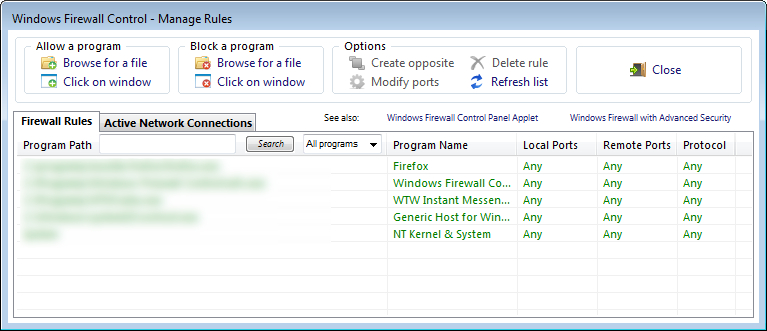
Windows Firewall Control - wersje rozwojowe

OXYGEN THIEF

Bardzo aktywny
Członek Załogi
Administrator
Dołączył
26 Maj 2010
Posty
46866
Reakcje/Polubienia
33291
Miasto
Trololololo
Ukazała się wersja beta wyśmienitego :ok rozszerzenia zapory systemowej wbudowanej w systemy Vista i 7.Wprowadzono ciekawe zmiany.
Windows Firewall Control beta 3.0.1.0
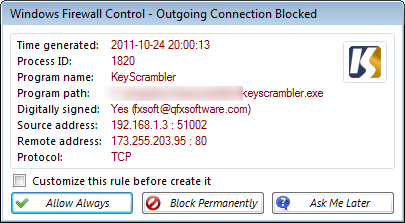
New beta 3.0.1.0 available:

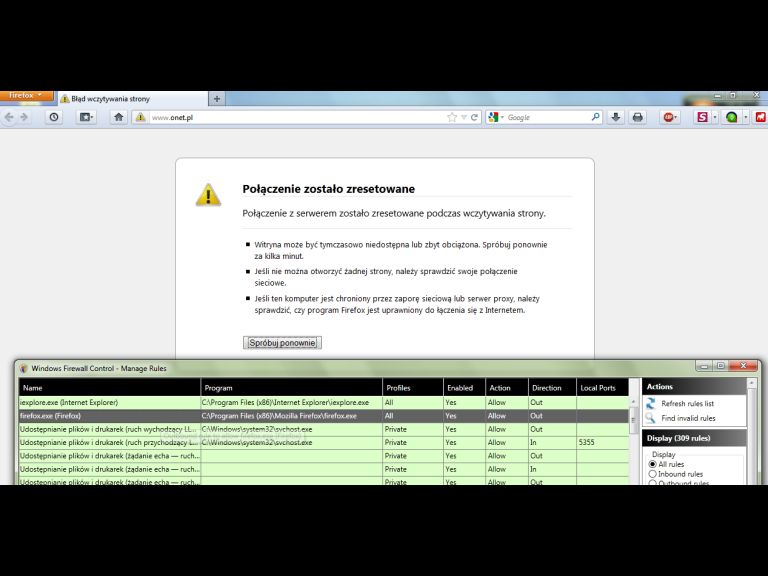
- New: Menu item "Manage Rules" from which the user can administrate more easily the firewall rules. This new menu replaces the menu items previously named "Show Rules...".
- Improved: All rules are listed in the same list, and the user has the posibility to filter them by different criteria. A rule that allows a program is coloured green, and a rule that blocks a program is coloured red.
- Improved: Local ports, remote ports and protocol, are displayed for all rules without requiring to select a rule.
- Fixed: The program includes now the both methods for creating a new rule.

Installation notes:
A clean install is required because from this version the rules are stored in a different way which was needed for the new improvements. Sorry for this, but it is absolutely necessary. The final version will be compatible with this beta. If you already use an old version, please uninstall that version, and at uninstallation choose to restore the Windows Firewall default settings.
D2AXC.jpg

8rOsK.jpg


Zaloguj lub Zarejestruj się aby zobaczyć!
 

OXYGEN THIEF

Bardzo aktywny
Członek Załogi
Administrator
Dołączył
26 Maj 2010
Posty
46866
Reakcje/Polubienia
33291
Miasto
Trololololo
Ukazała się nowa beta Windows FIrewall Control
Version 3.0.1.0 beta 2 is available to download:

What's is new since the last beta:
- The responsiveness of "Learning Mode" was increased by 40%.
- "Learning Mode" works now with all language localizations, due to a new discovery which makes easier the processing of data needed for notifications.
- The uninstallation procedure deletes also the file "wfc.exe".

Installation notes:
If you already use the first 3.0.1.0 beta 1, you can update without worries because all of your rules are preserved.
If you use any other version, a clean installation is neccesary because the new 3.0.1.0 version uses a new way of storing the firewall rules which makes it incompatible with earlier versions.

Zaloguj lub Zarejestruj się aby zobaczyć!
 

OXYGEN THIEF

Bardzo aktywny
Członek Załogi
Administrator
Dołączył
26 Maj 2010
Posty
46866
Reakcje/Polubienia
33291
Miasto
Trololololo
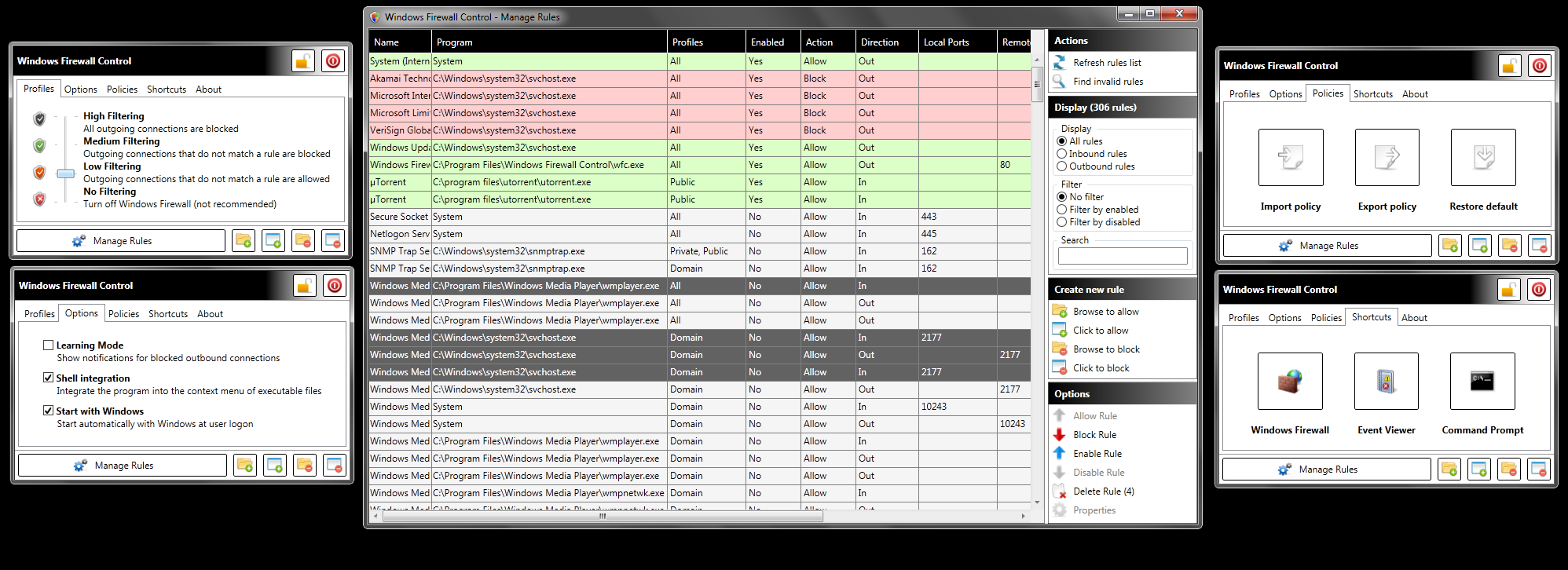
Windows Firewall Control 3.1.0.0 - Preview

What's new
- Added support to create multiple firewall rules for the same program using WFC.
- Added support to show multiple notifications for the same program, until the user select in the notification window: "Don't ask me again for this program".
- Added support to read all inbound and outbound rules from WFwAS, and show them in WFC.
- Added new columns in Manage Rules for: Profile, Enabled, Action, Service Name.
- Added new menu items in Manage Rules: Import Policy, Export Policy, Full Screen.
- Added new shortcuts in Manage Rules: Command Prompt, Network Tools, Keyboard Shortcuts.
- Added Manage Rules in taskbar when the window is active and madei it act like a normal window instead of beeing always on top.
- Added support to specify multiple port range as remote address.
- Added support to modify profiles for the firewall rules. Double click a rule in Manage Rules.
- Added support to do the search of a rule by pressing Enter key.
- Added several keyboard shortcuts in Manage Rules. Press on "Keyboard Shortcuts" in Manage Rules to see them.
- By clicking on the remote address in the notification window, a WHOIS query for this IP address will begin in the default browser by using networktools.nl
- By clicking on the program icon from the notification window, file properties dialog for this program will show up.
- "Active Network Connections" was removed due to the slow performance. Instead of this, in that window you will find listed the programs for that you selected not to show more notifications.
- Updated the optional firewall rules that are made at installation to create several rules for svchost.exe to block: Akamai Technologies, Microsoft Limited, VeriSign.
- Updated the optional firewall rules that are made at installation to create rules to allow only: WFC Updater, ICMP, Window Update.
- Shell Integration is now available for all users.
- More, which I can't remember now

Conclusions:
1. I have finally added full support fo WFwAS rules. The list in WFC is populated with WFwAS rules.
2. I am open to new improvements which you think that the final version should have.
3. Only normal DPI version is available now.

Installation notes:
1. Export your policy from WFwAS.
2. Uninstall old version of WFC and choose to restore to default Windows Firewall settings.
3. Import your policy from WFwAS.
4. Install version 3.1.0.0 of WFC.
5. You will have all of your rules in WFwAS and also in WFC.
6. Start using the new version of WFC and share your opinions here Thank you.

Download link:

Zaloguj lub Zarejestruj się aby zobaczyć!

Thank you for your support !
 

OXYGEN THIEF

Bardzo aktywny
Członek Załogi
Administrator
Dołączył
26 Maj 2010
Posty
46866
Reakcje/Polubienia
33291
Miasto
Trololololo
Windows Firewall Control 3.1.0.0 Preview 2
OXYGEN THIEF napisał:
I have fixed some incompatibilities and added a few new checks at the program execution.

Download link:

Zaloguj lub Zarejestruj się aby zobaczyć!
[advthumb]http://i.imgur.com/3DqSJ.jpg[/advthumb]
Thank you for your support !
 

OXYGEN THIEF

Bardzo aktywny
Członek Załogi
Administrator
Dołączył
26 Maj 2010
Posty
46866
Reakcje/Polubienia
33291
Miasto
Trololololo
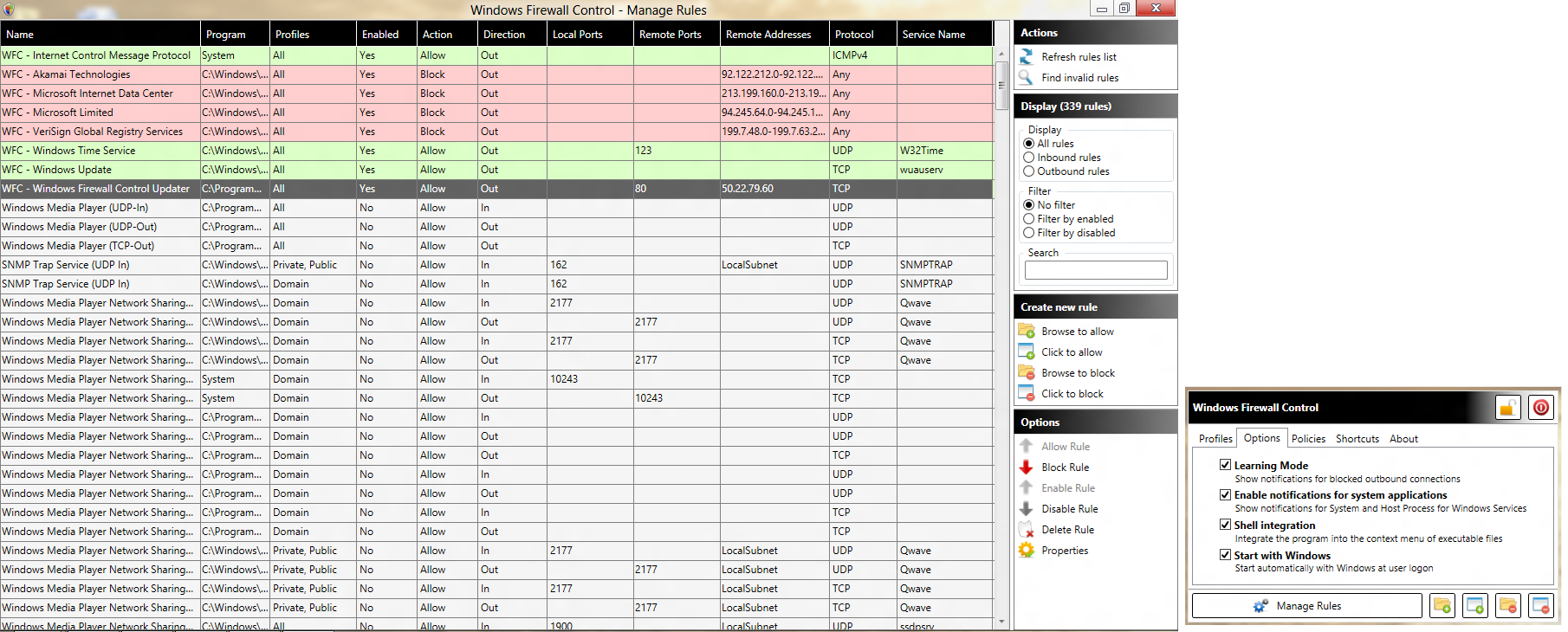
Windows Firewall Control
3.2.0.0.
This is available only here, for Wilders users. Only the final version will be published on the website after all the problems you may find in this version will be fixed.

What's new and good:
- No fee to upgrade to this new version.
- The new version scales fine on all DPI settings, due to using Windows Presentation Foundation.
- The program has now two components:
1. wfc.exe (Graphical User Interface)
2. wfcs.exe (Windows Service)
- WFC no longer requires elevated privileges at runtime because all the tasks are done by the WFCS service under LocalSystem account. Elevated privileges are still required at installation or update.
- Start with Windows does not use Task Scheduler anymore.
- Lock feature does not rely on GroupPolicy anymore and Windows Registry entries.
- Validations of the parameters of a new rule are made before it's creation.
- Multiple rule names are supported.
- Multiple selection in Manage Rules is supported. Also deletion can be made on multiple rules in the same time.

What's new and still to be worked at:
- This version requires a new activation code because the licensing system was changed entirely. Registered users can generate a new activation code from their accounts on our website.
- Memory consumption is a little high, but this is because of WPF and NET Framework.

Please report any bugs, or suggest new improvements, on this topic or at email:

Zaloguj lub Zarejestruj się aby zobaczyć!
. Please try it and let me know if you like the new version.
F7SDw.png

Thank you for your patience and your support.
Alexandru

DOWNLOAD LINK:

Zaloguj lub Zarejestruj się aby zobaczyć!
 

OXYGEN THIEF

Bardzo aktywny
Członek Załogi
Administrator
Dołączył
26 Maj 2010
Posty
46866
Reakcje/Polubienia
33291
Miasto
Trololololo
Windows Firewall Control beta 3.2.0.1
This build has version 3.2.0.1. I did this to make the new version to update the previous beta. The final version probably will be set to 3.3.0.0.

What's new:
- New: On options tab I added a new checkbox named "Enable notifications for system applications". If this one is checked you will receive notifications including for "System" and "svchost.exe". If this remains unchecked you will receive notifications only for your regular programs. Please note that this checkbox is available only when "Learning Mode" is checked.
- New: The text items from the cells in "Manage Rules" are now trimmed if they are longer than the cell width. If the text is trimmed, a tooltip is available on mouse over on the cell.
- Fixed: "Learning Mode" not working on some systems due to insufficient user privileges to read the security events.
- Fixed: Refreshing the firewall rules in "Manage Rules" did not work until restarting the program.
- Fixed: The selected tab item was reset to the first one at hiding of the main window. Now the last tab viewed is remembered.
- Added a rule for WIndows Time Service in the list of optional recommended rules. This is available at installation.
- Renamed the optional recommended rules with the prefix "WFC - ruleName". Also they have now description of their purpose.

And many more bug fixes which I don't remember now

What is not yet ready:
- Lock feature does not work as expected on x64 bit operating systems.

Please report bugs and suggest new improvements on this topic or at:

Zaloguj lub Zarejestruj się aby zobaczyć!
.

Thank you for your support.
Alexandru
iVjUG.png

DOWNLOAD LINK:

Zaloguj lub Zarejestruj się aby zobaczyć!
 

Conti

Bardzo aktywny
Fąfel
Dołączył
28 Maj 2010
Posty
978
Reakcje/Polubienia
76
A więc wczoraj go zainstalowałem i d*pa blada
Poziom bezpieczeństwa "low" -> działa, cóż wyłączenie też działa
Ale poziom bezpieczeństwa "medium" już nie. W medium trzeba samemu wskazywać programy zaufane które mogą łączyć się z netem. to to na pierwszy ogień firefox -> wskazany, dopisany do listy reguł jako zaufany i wszystkomogący, zezwalaj na wszystko itp. Dusza blada, brak łączności z netem.
Potem IE9 -> j.w.
Potem Poczta Live -> j.w.
Potem ........
Nie udało mi się zmusić aby którykolwiek z w/w programów zadziałał

O.T.
Więc na ruszt wziąłem windows 7 firewall controll -> śmiga jak ta lala i wszystko działa ok, za wyjątkiem tego że program płatny a w wersji free ograniczony w denerwujący sposób - nie można zapamiętywać reguł dla wydarzeń systemowych - co jest wredne i irytujące.
OXY nie masz przypadkiem znajomych wśród tych od win 7 firewall controll ??

Zaloguj lub Zarejestruj się aby zobaczyć!

P.S.
Widzę, że to co wyżej podałeś to już nowsza wersja niż ta co wczoraj ściągnąłem. Zaraz znowu potestuje ....
 

OXYGEN THIEF

Bardzo aktywny
Członek Załogi
Administrator
Dołączył
26 Maj 2010
Posty
46866
Reakcje/Polubienia
33291
Miasto
Trololololo
Mi tam na win 7 śmiga bardzo fajnie ( bety i stabilne), z tych wszystkich nakładek firewallowych akurat Windows Firewall Control wydaje się być najlepszym ( jak dla mnie)
Medium poziom tak ma, jeśli nie ma reguły to nie ma dostępu do sieci, za 10$ można kupić pełną wersję gdzie jest tryb uczenia ( pyta się o połączenia), a tak to trzeba wskazywać programy które mogą się łączyć.aha program chyba wymaga praw admina do poprawnego działania.

jeśli chodzi o ten drugi soft to jakieś licki mam, ale już nie pasują do ostatnio wydanej v5
 

Conti

Bardzo aktywny
Fąfel
Dołączył
28 Maj 2010
Posty
978
Reakcje/Polubienia
76
a u mnie dusza
zainstalowałem tą najnowszą, pierwsze co zrobiła to zwis kompa
potem poszło już gładko ale na ustawieniu medium:
JqkRQ.png
 

OXYGEN THIEF

Bardzo aktywny
Członek Załogi
Administrator
Dołączył
26 Maj 2010
Posty
46866
Reakcje/Polubienia
33291
Miasto
Trololololo
to beta więc ma prawo nie działać, ze stabilną wersja jest tak samo ?

Zaloguj lub Zarejestruj się aby zobaczyć!
 

Conti

Bardzo aktywny
Fąfel
Dołączył
28 Maj 2010
Posty
978
Reakcje/Polubienia
76
testowane na 3.0.1.2; 3.1.0.3, 3.2.0.1;
Za każdym razem to samo, zmienia się tylko wygląd programu.

P.S.
Się posypało, znowu cofałem snapa ....
Nic to, nie jest mi to do szczęścia potrzebne ....
 

OXYGEN THIEF

Bardzo aktywny
Członek Załogi
Administrator
Dołączył
26 Maj 2010
Posty
46866
Reakcje/Polubienia
33291
Miasto
Trololololo
Więc pozostaje tylko support, a może nawet kodzik da po rozwiązaniu problemu :D
 

OXYGEN THIEF

Bardzo aktywny
Członek Załogi
Administrator
Dołączył
26 Maj 2010
Posty
46866
Reakcje/Polubienia
33291
Miasto
Trololololo
Windows Firewall Control 3.2.0.2
What's new:
- New: Selection of multiple executable files from the same folder is now permitted. In this way a user can create multiple firewall rules, all together, for programs which require to allow/block multiple executable files.
- Update: Last browsed folder is now remembered.
- Fixed: The new executable file runs in 64bit mode on 64bit operating systems. The Task Manager from 64bit operating systems will display correctly "wfc.exe" instead of "wfc.exe *32".
- Fixed: Lock feature works now on 64bit operating systems.

DOWNLOAD LINK:

Zaloguj lub Zarejestruj się aby zobaczyć!
Installation notes:
Even if this version can update the previous beta version, it is recommended to uninstall the previous version and do a clean install.

Please report bugs and suggest new improvements on this topic or at:

Zaloguj lub Zarejestruj się aby zobaczyć!

I'll do some more tests on various operating systems and if no more problems will be reported, I will publish to the website the final version which will be 3.3.0.0.

Thank you all for your support.
Alexandru
 

OXYGEN THIEF

Bardzo aktywny
Członek Załogi
Administrator
Dołączył
26 Maj 2010
Posty
46866
Reakcje/Polubienia
33291
Miasto
Trololololo
Version 3.3.0.4 beta available


What's new:

- New: "Learning Mode" was redesigned from scratch. The latency between a blocked connection and the user notification was reduced by 90%.
- Updated: Notification window contains now the time of the blocked connection. The tooltip for the application name was updated to contain the full application name.
- Updated: The validation rules were reworked from scratch. Also, the visual template, in case of user input contains errors.
- Updated: Added support for "Learning Mode" for Windows 8 Release Preview. Tested on x86 english version.
- New: "Properties" window was redesigned. Now, a user can create a rule for all programs or he can choose only a specific executable file.
- New: Multiple notifications are now cached and showed one by one. Until now, while the notification window was displayed, any blocked connection during this time was ignored completely. From now, notifications will wait until the user closes the current notification and the new notifications will be displayed one by one.
- And many more, which will be included in the final change log.

Download link:


Zaloguj lub Zarejestruj się aby zobaczyć!
 

OXYGEN THIEF

Bardzo aktywny
Członek Załogi
Administrator
Dołączył
26 Maj 2010
Posty
46866
Reakcje/Polubienia
33291
Miasto
Trololololo
Version 3.3.0.4 beta 2 available
Ok, I fixed today the problems that were reported by multiple users.

What's new since the version from yesterday:

- Fix: Now the Learning Mode works again on Windows Vista. I forgot to uncomment a few lines of code.
- Fix: The program hangs on some computers when the user clicks to allow the program from the notification window, requiring to be ended from Task Manager. There were some synchronization problems between wfc.exe and wfcs.exe which could lead to hanging of the program. It is fixed now.
- New: If wfc.exe is not initialized correctly it will have a warning icon in the system tray and the tooltip "Failed to establish connection to Windows service". This means that wfcs.exe is not found or it is set to disabled.

Download link Remains the same, but contains the updated version:

Zaloguj lub Zarejestruj się aby zobaczyć!
 
Do góry