The app should now properly detect the Windows version, including Windows 11 24H2.
The installer allows you to skip the addition of the Start menu folder.
Added the option to permanently enable the Ribbon UI in File Explorer on Windows 11.
An option to disable ads in the Start menu, in the "Recommended" section. The option is in Behavior > Ads and Unwanted apps.
Individual Edge tweaking options are now live on a new page, and they are greatly expanded. Check out Microsoft Edge > Disable Annoyances and Bloat. There, you will find settings to disable sidebar, tips and promotions on desktop, prompts to set Edge as your default browser, floating Bing bar on desktop, remove news and "quick links" from the New tab page, and much, much more.
You can now remove the "Edit with Clipchamp" context menu entry.
The Tools System Restore page now has an option to quickly restart the device to Windows Recovery Environment.
I have fixed a few tweaks that stopped working in 24H2, such as add/remove This PC folders.
I have removed the "Folder options" page as Microsoft is no longer going to remove those.
Removed the "test" message from the Hide Settings pages option (I use MessageBox debugging, yeah-yeah).
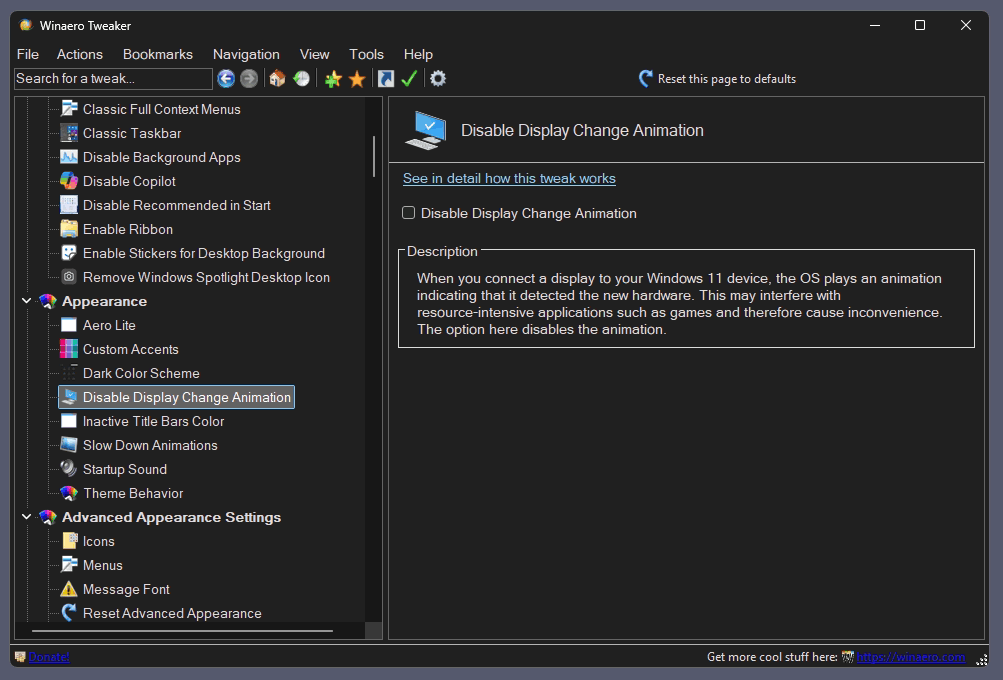
Added the ability to disable display animation when you connect a new display to your Windows 11 device. Starting in Windows 22H2, it can be disabled in the Registry, so the app now offers a GUI for that. You will find the checkbox under Appearance > Disable Display Change Animation. I say thanks to "Aerath Xlythe" for this.
Changes
Dark Mode
Now all the dialog boxes use the proper color mode. Those include, but not limited to, the About dialog, Reset all tweaks, Import/Export tweaks, Visible Tweaks, and so on.
All disabled controls where displayed with the black font color on the dark background. While I have fixed most of them (see known issues below), I already regret that I added the dark theme support to the app.
The search pane now respects the dark theme.
Other
Most of the taskbar options are now hidden in Windows 11, as they do nothing. I kept them for users who combine my app with the excellent
app. It is a paid but not expensive software that re-adds the lost flexibility to Windows 11. In my opinion, it is a must-have addition to the OS.
Bug fixes
Xmouse
I was so happy to make the Xmouse options working again in version 1.64, so I accidentally removed the code that disables it! Once you enable Xmouse in 1.64, you cannot disable it. I have fixed this in 1.64.1.
Added the ability to apply the accent color to the taskbar only, without applying it to the start menu and the notification center. Works on both Windows 11 and 10.
with some extra options. You can save it to HTA, or to a custom destination using the GUI. It will open instantly.
Added the ability to add the "Restart to UEFI Firmware" context menu.
Added the Tools \ Shutdown/Restart/Hibernate page with extra shut down options. For example, you are restart to Advanced Startup Options directly from there.
Added the ability to create shortcuts for Advanced Startup Options and UEFI Firmware in the Shortcuts \ Shutdown shortcuts option.
Fixed a wrong "More info" link for the Add Windows Update menu to desktop page.
Refined the appearance of the Information page: The app version font is no longer tiny. The icons are no longer blurry.
Witaj gościu. Dziękujemy, że przeglądasz nasze forum ale czy wiesz, że zakładając konto możesz w pełni korzystać z dobrodziejstw jakimi są promocje i konkursy. Nie zobaczysz tu też żadnych reklam a rejestracja zajmie Ci tylko chwilę.
Ta strona wykorzystuje ciasteczka (cookies) w celu: utrzymania sesji zalogowanego Użytkownika, gromadzenia informacji związanych z korzystaniem z serwisu, ułatwienia Użytkownikom korzystania z niego, dopasowania treści wyświetlanych Użytkownikowi oraz tworzenia statystyk oglądalności czy efektywności publikowanych reklam.Użytkownik ma możliwość skonfigurowania ustawień cookies za pomocą ustawień swojej przeglądarki internetowej. Użytkownik wyraża zgodę na używanie i wykorzystywanie cookies oraz ma możliwość wyłączenia cookies za pomocą ustawień swojej przeglądarki internetowej.