Uninstalr - A free uninstall tool from the jv16PowerTools team

khanyash

Bardzo aktywny
Moderator
Ekspert
Dołączył
25 Czerwiec 2017
Posty
197
Reakcje/Polubienia
2073
Uninstalr - The Best Uninstaller for Windows

Zaloguj lub Zarejestruj się aby zobaczyć!


Version 1.0 was released on July 27, 2023
First public version release

Download Portable
Zaloguj lub Zarejestruj się aby zobaczyć!

Download Installer
Zaloguj lub Zarejestruj się aby zobaczyć!


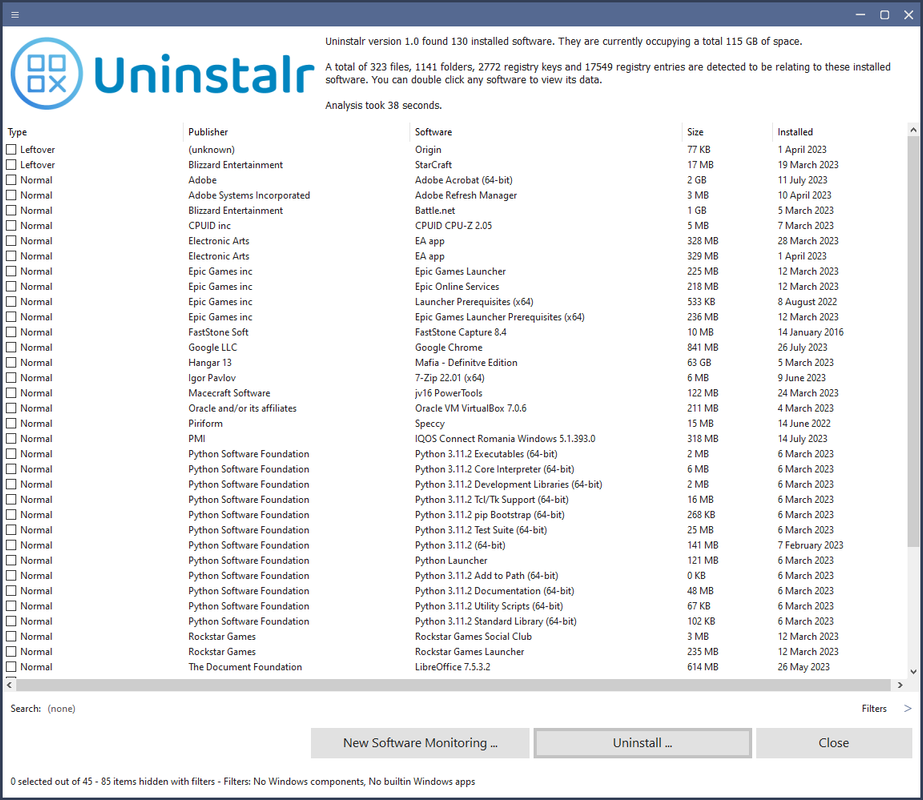
uninstalr-main.png


Uninstalr is an easy to use and very accurate software uninstaller for Windows. It can uninstall multiple apps at the same time.

Key Features
  • Batch uninstall many apps at the same time.
  • Supports unattended uninstallation of apps.
  • Supports monitoring of new software installations.
  • Also detects portable apps and previously uninstalled software leftovers.
  • Shows all the data added to your system by installed software on a file by file basis.
  • Shows all the data it will remove before starting the uninstallation.
  • Filter and search the list of installed software.
  • According to our
    Zaloguj lub Zarejestruj się aby zobaczyć!
    , Uninstalr is the most accurate software uninstaller by leaving the least amount of leftovers when uninstalling apps.
  • Supports detection and uninstallation of Microsoft Store, Steam, Big Fish Game System, Chocolatey, NuGet and Ninite installed software.
  • Supports Windows Dark Mode.
  • Supports Windows 11, 10, 8 and 7.
  • Comes with these translations builtin: Chinese Simplified, Chinese Traditional, Czech, Danish, English, Filipino, Finnish, French, German, Greek, Hindi, Hungarian, Indonesian, Italian, Japanese, Korean, Malay, Norwegian, Polish, Portuguese, Romanian, Slovak, Spanish, Swedish, Thai, Turkish, Ukrainian and Vietnamese.
  • Has a single executable file portable version and a normal setup version.
  • Uninstalr is freeware, lightweight and easy to use. No bells and whistles, no nonsense.
 

Camel1965

Bardzo aktywny
Zasłużony
Dołączył
8 Wrzesień 2010
Posty
52842
Reakcje/Polubienia
39861

Uninstalr 2.3​

Improvement: Greatly improved the program’s efficiency in uninstalling apps.
Improvement: Greatly improved the accuracy of detecting portable apps from the system.
Improvement: The analysis of installed apps will now work faster in systems with 200+ installed apps.
Improvement: The program now warns the user in case Microsoft PowerShell is missing or disabled in the system. Uninstalr can be used in such cases, but its performance is not optimal and now users is made aware of this.
Improvement: The program now warns the user in case Microsoft OneDrive seems to be syncing data from the system. This can cause OneDrive restoring an app that Uninstalr just uninstalled, making it look like Uninstalr failed to uninstall it.
Improvement: The program now performs checks to confirm it has full access to modify the system before starting to uninstall anything. If there is no full access, the uninstallation can still be started but the uninstallation performance will not be optimal and user is informed about this.
Improvement: The program now instructs user to choose "no" in case there is a popup during the uninstallation process asking whether the user wants to restart the computer.
Improvement: After the program has started, it will still continue to perform certain analysis tasks on the background until they are all completed. During this process, the numbers relating to installed software and the number of detected paths will update on the user interface. Such changing numbers within the user interface could seem a bit odd, that is why the user interface now contains a message explaining this to the user.
Improvement: The program can now detect more anti-virus and other system security related software and can warn user if they are about to uninstall such software with Uninstalr. This type of software is typically protected against automatic uninstallation and therefore uninstallation with Uninstalr will probably fail. Uninstallation of anti-virus or other security related software should only be done by following the tools and instructions of the publishers of such software, never with any third party tools.
Improvement: Detecting leftovers of old apps is never 100% accurate. Therefore, Uninstalr will now display an additional warning to ensure user knows what they are doing, if they are attempting to remove any app that Uninstalr is saying looks like a leftover and the wording in general has been changed from "Leftover" to "Possible leftover" to highlight this further.
Improvement: The program now reports when it is waiting for the System Restore Point of being created. Since this process is up to Windows and can take many minutes, it’s better for the UI to tell the user that this is what is happening.
Improvement: Added an option to disable the use of automatically running script files to finalize the uninstallation.
Improvement: You can now choose to use the standard Windows buttons within the program. This can be adjusted within the Settings view.
Improvement: In the Right Click > Fix Information view, the Jump To Software feature is now only visible if there are three or more items on the list.
Improvement: Improved the accuracy of "You are about to uninstall app1 and not app2 and these two apps seem to be related, are you sure?" warning so it won’t be displayed on apps which are not similar in nature. That being said, there is no problem of showing the warning too often, so it’s still calibrated to rather show the warning too often than too rarely.
Improvement: The program can now be better used in smaller display sizes and screen resolutions. If there is not enough space on the screen, the program will simply hide non-critical user interface elements.
Improvement: The app type, filter and sort menus now look better.
Improvement: Added options to select and unselect apps by their app type and publisher.
Improvement: Added a new feature called Ignore Paths to the Settings. This feature allows you to define any file system or registry paths that you don’t want Uninstlar to analyze or even touch. This can be used as one more layer of protection to ensure no important files are ever removed when uninstalling apps with Uninstalr.
Improvement: Improved compatibility with Steam platform and Steam games. For example, Uninstalr is now better in detecting the size of installed Steam games.

Fix: Selecting an app and using the Right Click > Show Data did not show all the paths of the app. Only using the Uninstall option would show all the paths.
Fix: The user interface in the Settings view could look pretty bad on some screen resolutions and/or app window sizes. Texts could be partially overlapping and so on.
Fix: The program was not able to detect the installation of Windows Hardware Lab Kit software, as well as some other similar apps.
Fix: The program was not able to detect the installation of some Chinese software, such as a program called 360安全卫士
Fix: The program was not always able to detect app called WhyNotWin11, or it was incorrectly listed as "WhyNotWin"
Fix: The program could display Access Violation or Out Of Memory error on some systems. This problem might not be fully fixed, that is, it might still occur on some systems, but it should be at least partially fixed. The reason for this vague wording is that I have been unable to reproduce the problem in any test system, which means it’s a very rare issue, only happening on very specific systems and therefore, fixing it has also been very challenging.
Fix: Changing the font size setting of the program didn’t work very well. The preview was poor and the setting was not always even saved properly. It’s still not perfect, but it’s much better.
Fix: Writing something to the Hide filter will randomly move the focus to the Search filter, which makes using the Hide filter very annoying.Fix: Starting to type something while on the main view adds that text to the Search filter input. This was working, but starting to type could sometimes randomly add the typed letter as upper case.
Fix: The program was not able to fully uninstall some builtin Windows apps, such as the Weather app.
Fix: The selection logic was confusing. If you used a filter to show only specific apps, then did Select All, also the currently hidden apps were selected, which could be confusing. Now the Select All and Select Inverse operations only apply to apps visible on the list of apps. Select None applies to all apps, though. Just in case.
Fix: There could be a rather long, up to a few seconds delay after clicking the first Uninstall button before anything happened on the screen.
Fix: When the uninstallation started, the progress screen could display "Uninstalling: " without any other information, such as the name of the app currently being uninstalled. This was a cosmetic issue, but could cause confusion.
Fix: It was possible for the app type or filter menus to remain visible when the list of installed apps was being regenerated.

Known Issues:
1) The program is not fully compatible with screen reader software.
2) Changing the program’s font size from its Settings doesn't work as well as it should. It’s much better in this version than in 2.2, but it's still not good enough.
3) Opening the Right Click > Fix Information can have a few second delay. This should have a progress indication.
4) Automatic system restart might sometimes fail with Windows asking the user to confirm the restart because some app is still running.
Zaloguj lub Zarejestruj się aby zobaczyć!


Zaloguj lub Zarejestruj się aby zobaczyć!
 

Camel1965

Bardzo aktywny
Zasłużony
Dołączył
8 Wrzesień 2010
Posty
52842
Reakcje/Polubienia
39861

Uninstalr 3.0​

  • Key Changes:
  • The installed apps list now shows the country of origin for all known installed apps.
  • The main user interface and the before uninstallation paths view both now displays checkboxes, allowing easier selection of data to be removed.
  • The main window bar now includes Settings and About buttons.
  • Improvements:
  • The installed apps list now shows the country of origin for all known installed apps.
  • The listing of paths before uninstallation starts now displays checkboxes, allows user to uncheck any paths user doesn’t want to be removed. Editing the list of paths was also posssible before, but since the UI was not very clear about this, many users were not aware of this.
  • Uninstalr now attempts to automatically detect system backup paths and adds them to the list of ignored paths.
  • The main window bar now includes Settings and About buttons.
  • Greatly improved support for detecting portable apps, especially NirLauncher ones.
  • Greatly improved support for detecting leftover app detection.
  • After software is uninstalled and the system restarted, Uninstalr now also says how long the entire process took.
  • Improved support for systems with software installed over multiple drives.
  • The Settings now also shows the builtin ignore list that contains all the automatically ignored folders from the system.
  • Improved protection against potentially unwanted detections related to any software source code repositories stored in the system.
  • Scrolling the Settings using the mouse wheel is now much smoother.
  • The program now shows an additional warning message if you try to uninstall a potential leftover software. (Spoiler alert: You should not uninstall something just because Uninstalr says it could be a leftover. Notice the word COULD.)
  • Added an option to skip the installed app size analysis to improve scan speed.
  • The capitalization of software names is now handled better. For example, previously WinRAR could be listed as Winrar or WinRar.
  • Installed software are now listed without their version number after the name. The version number is displayed normally under the name row.
  • The program now uses less RAM.
  • The program could list paths that do not actually exist in the path listing before uninstallation. While this was by design, and explained in the UI, it was rather confusing and many people reported it as a bug. This is no longer done and instead, the Settings now contain an option about allowing Uninstalr to delete any app related paths that did not exist before the uninstallation started. Yes, sometimes running the app's own uninstaller actually creates leftovers. This setting is to remove those.
  • Fixes:
  • Known issue fixed: Uninstalling some apps, such as WinRAR, did not always fully remove everything. Usually uninstalling the app again finally removed it.
  • Known issue fixed: The progress bar isn’t always showing the progress as well as it should.
  • Known issue fixed: Portable apps stored directly on a drive root, such as C:WinFindr_Portable.exe, were not detected.
  • Known issue fixed: Portable apps stored on other drives than the C drive were not detected.
  • Uninstalling some software, such as Core Temp, took over 15 minutes.
  • While software was being uninstalled, the progress screen could display paths of unrelating software. While this was entirely a cosmetic issue, it could cause the user to think that wrong data was being removed (it wasn’t).
  • Scrolling the list of installed apps doesn’t work using the mouse scroll wheel on some systems.
  • Uninstalr failed to detect Tor Browser.
  • Uninstalr could get confused if you had software installed in many hard drives.
  • The Settings page could be shown with the scroll bar not reset to the top position.
  • If you had the same software installed twice, first as a normal software and then as an app from Microsoft Store, only the normal version could be listed.
  • Using the Right Click > Regenerate list didn’t reset the search filters.
  • Using the Right Click > Regenerate could cause some installed software not be listed after the list of installed apps was regenerated.
  • The program could crash with Access Violation error message on some systems. This was a very rare bug affecting only very few people.
  • Clicking Show Data button didn't display any kind of progress, which could make the user think nothing was happening.
  • The program failed to detect many builtin Windows apps. Note: To see these, you need to enable the option under App Types. They are hidden by default.
  • Detection of NirSoft portable apps didn't always work properly.
  • If you chose No or Cancel option on the additional warning popup about similar apps being uninstalled, more similar warnings could be still shown before the operation was property cancelled.
  • If you had two apps with the same name and same publisher installed to the system (for example, two different versions of the same app), they would always be listed in random order when the list was sorted.
Zaloguj lub Zarejestruj się aby zobaczyć!


Zaloguj lub Zarejestruj się aby zobaczyć!
 
Do góry