

- Dołączył
- 26 Maj 2010
- Posty
- 21894
- Reakcje/Polubienia
- 68208
- Reduced package size:
- We reduced the package size by over 180 MB.
- Right Click Context Menu:
- You can now access quick actions by right clicking on the Home page, including options like toggling widgets and adding new panes. This dedicated menu makes it easier to customize your Home layout without leaving the page.
- Tabs:
- Added path hints for tabs with the same name, so it is easier to distinguish similarly named folders opened from different locations.
- 7z Options:
- Added 7z dictionary and word size options to the compression workflow. These advanced options provide more control when tuning archive size versus compression speed.
- Compression Attributes:
- Added support for applying compression attributes across multiple selected files from the Properties window.
- Details Pane:
- The Details Pane now includes a storage overview for Cloud Drives.
- Sidebar Drag and Drop:
- Added support for dragging sidebar items into other apps.
- Sidebar Toggle Action:
- Added a dedicated action to toggle the sidebar, giving you a faster way to show or hide navigation space when you want to focus on content. You can also access this action through the Ctrl + B keyboard shortcut.
- Scrolling:
- Added middle click to scroll, making navigation smoother in long directories and providing another familiar input method.
- Fixes:
- Fixed wrong scroll position when switching out of semantic zoom.
- Fixed issue with opening images in Microsoft Photos.
- Fixed an issue where git remotes pointing to a local bare repository were not displaying.
- Fixed an issue where thumbnails didn’t load for MTP devices.
- Fixed an issue where the Third Party Libraries section was cut off.
- Fixed Status Center display when canceling extraction.
- Fixed an issue with opening Control Panel from desktop.
- Fixed the size of the Settings dialog close button.
- Fixed an issue where the Run With PowerShell action wasn’t disabled in Recycle Bin.
- Fixed tooltip labels on the Tags settings page
What’s new in Files v4.2
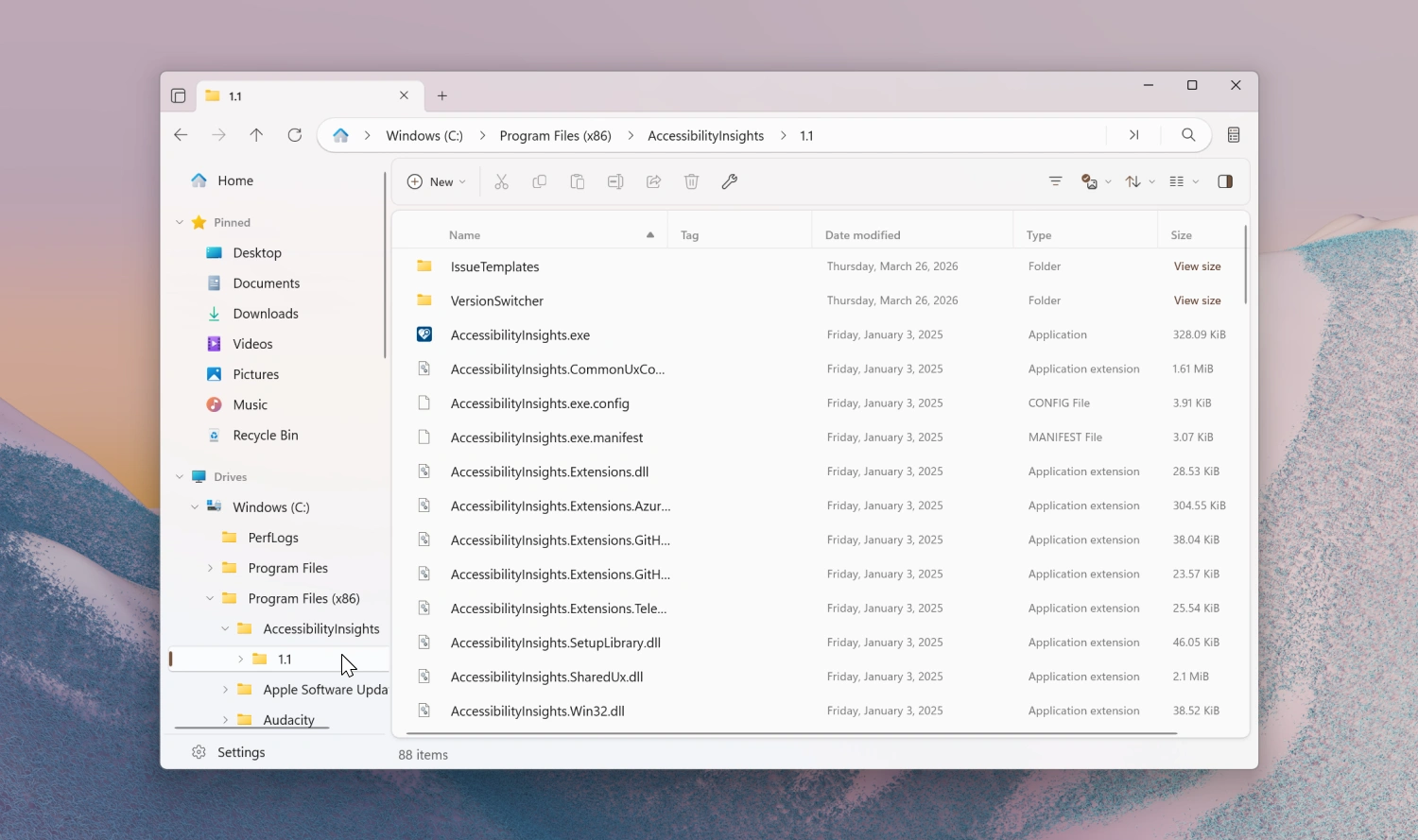
Tree View sidebar
The sidebar now includes a new Tree View that displays your folders in an expandable hierarchy, making it easier to navigate deeply nested directories without leaving the current location.
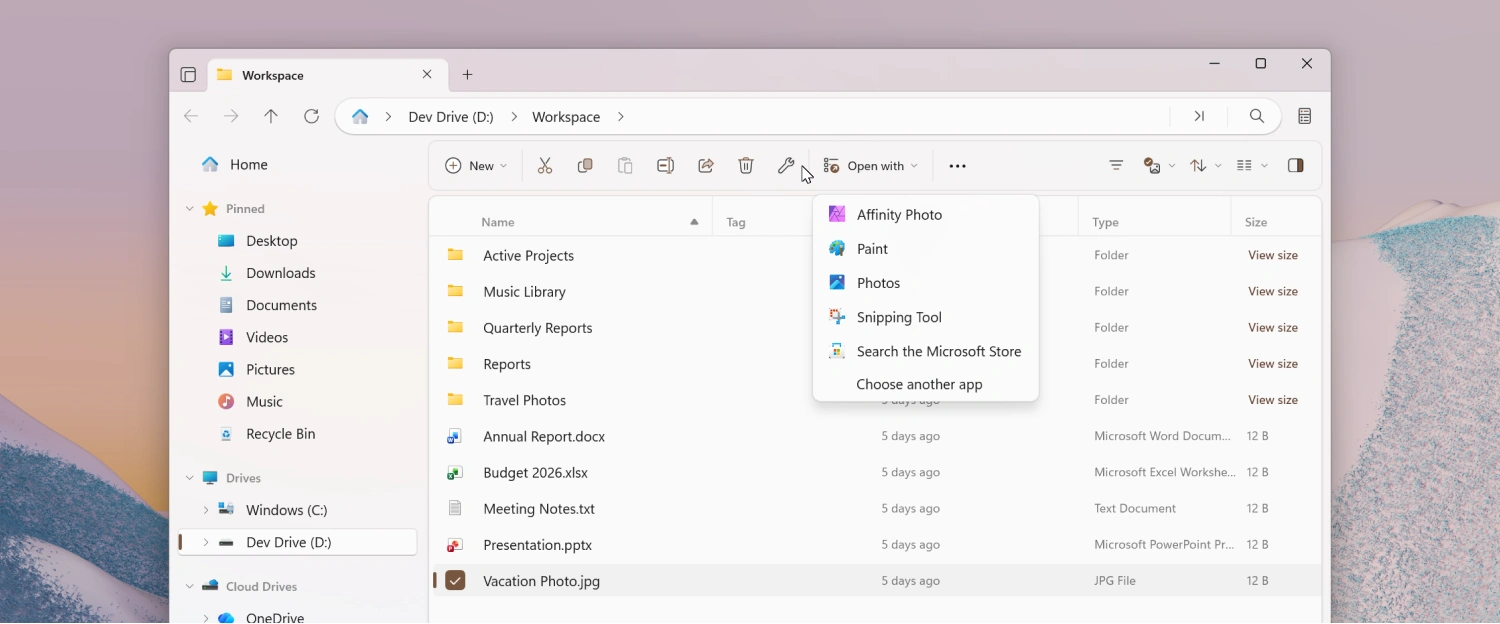
Open With toolbar flyout
A new Open With flyout has been added to the toolbar, giving you quick access to the apps that can open the currently selected file.
To enable the Open with… button:
- Right-click the toolbar and select Customize toolbar.
- Expand the Open group on the left.
- Drag Open With… to the list of added toolbar items.
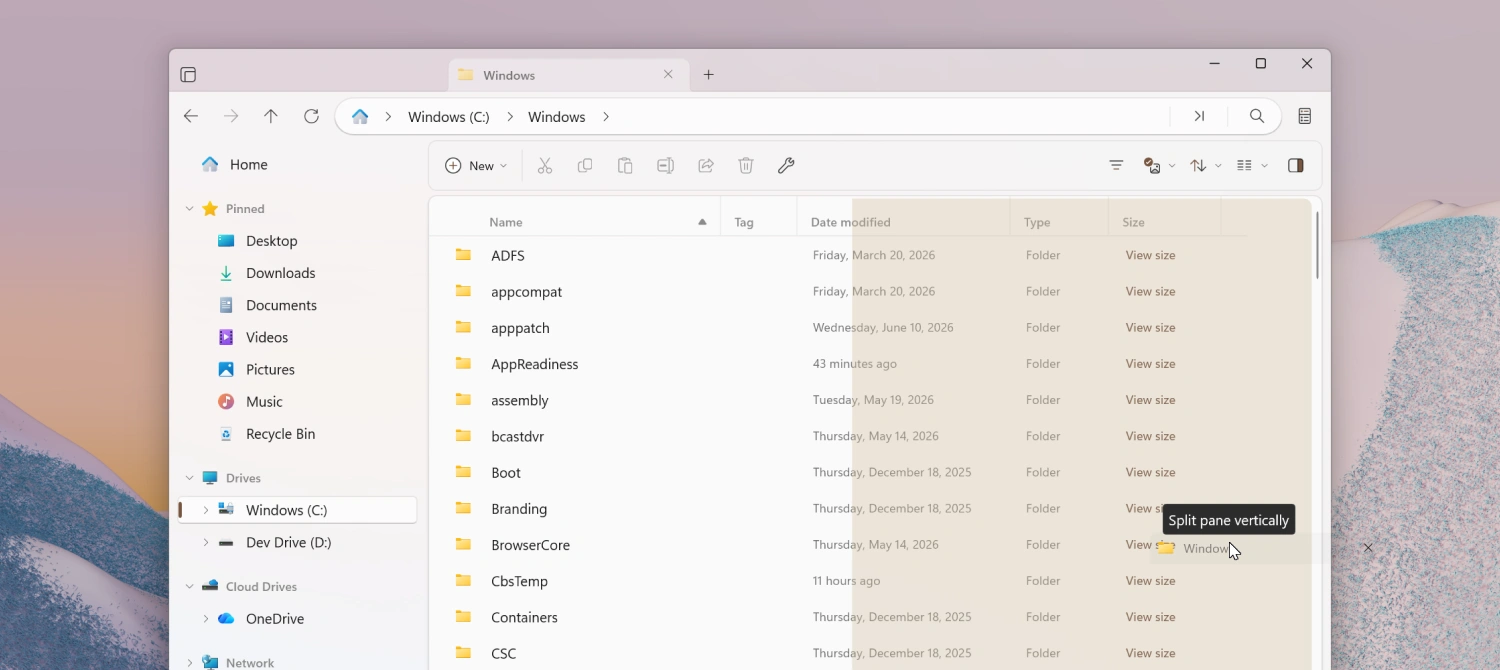
Drag a tab to create a new pane
You can now open a second pane by dragging a tab. Drop the tab on the left or right side of the file area for a vertical split, or on the top or bottom for a horizontal split, making it even easier to work with multiple locations at once.
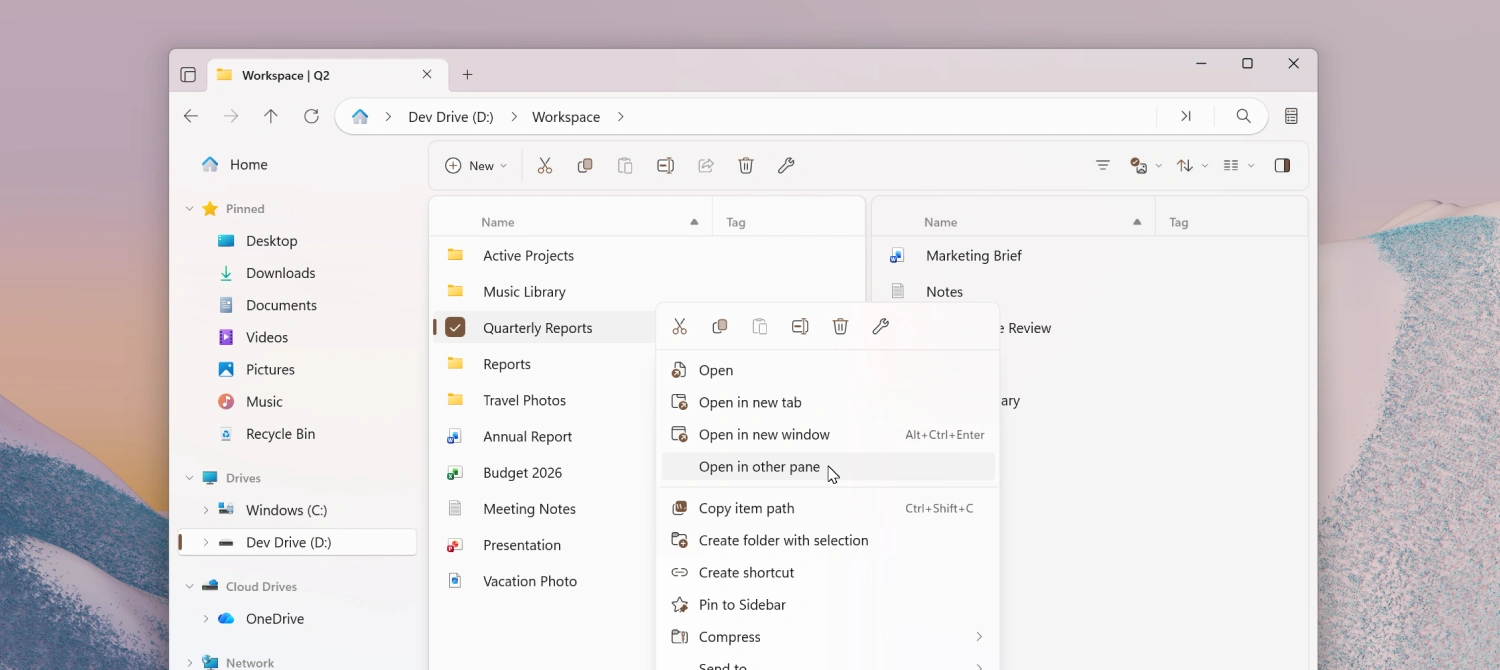
Open folders in the other pane
A new Open in other pane action lets you open the currently selected folder in the other pane. This action is available when multiple panes are open inZaloguj lub Zarejestruj się aby zobaczyć!mode and can be accessed from the right-click context menu andZaloguj lub Zarejestruj się aby zobaczyć!. You can also assign it a keyboard shortcut from theZaloguj lub Zarejestruj się aby zobaczyć!page in Settings.
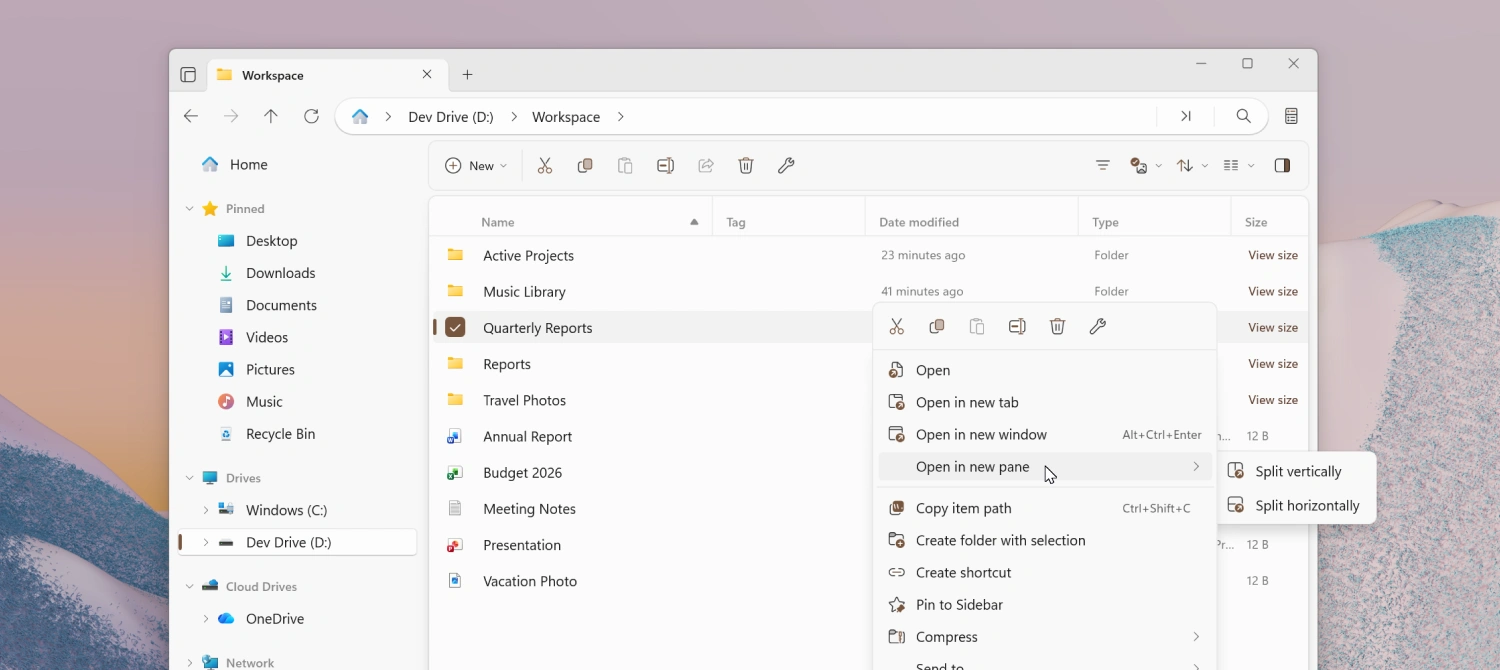
Open in new pane improvements
TheZaloguj lub Zarejestruj się aby zobaczyć!context menu entry has been reorganized to let you choose the arrangement of the new pane. This action is available when there is a single pane and can be accessed from the right-click menu andZaloguj lub Zarejestruj się aby zobaczyć!. You can also assign it a keyboard shortcut from theZaloguj lub Zarejestruj się aby zobaczyć!page in Settings.
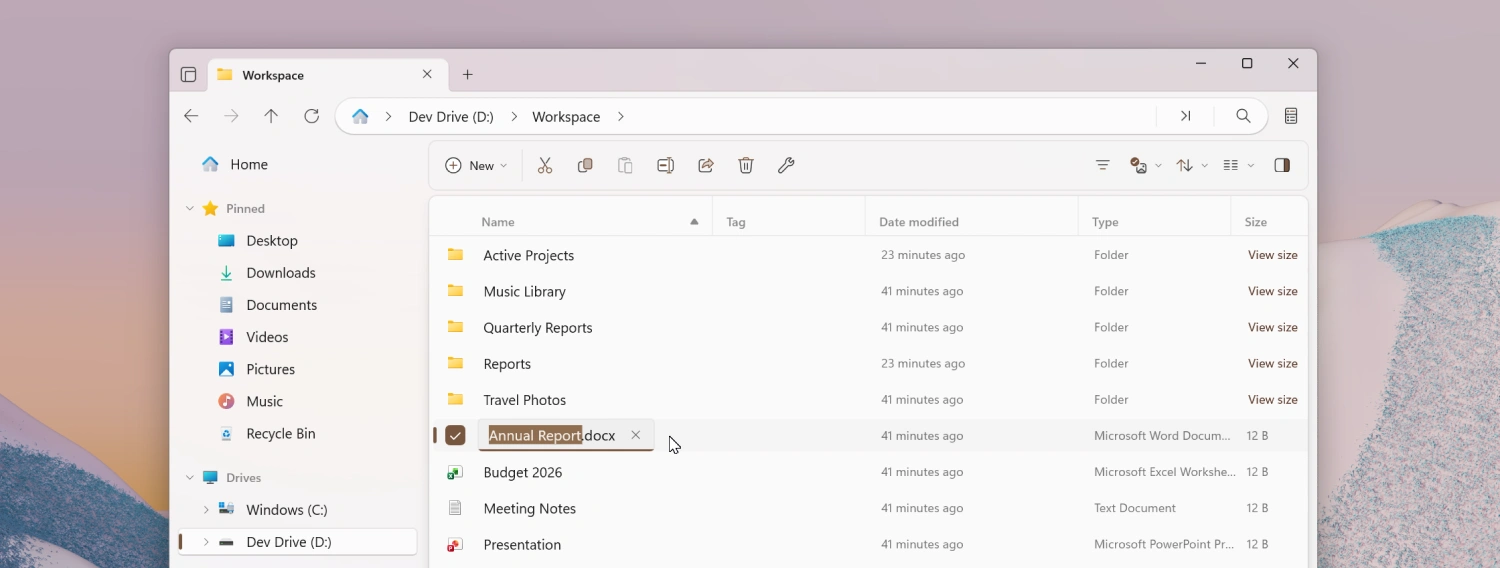
Always show file extensions when renaming
When you rename a file, the file extension is now always shown even whenZaloguj lub Zarejestruj się aby zobaczyć!is turned off in Settings. This allows users to easily edit file extensions, while at the same time keeping them hidden in the main file area.
Media file metadata improvements
Editing media file metadata such as title, artists, album, year, and genre has been supported for a while, but until now you could only modify existing metadata. Starting with this release, you can also add metadata to fields that were previously empty.
Modifying album covers has been supported for a while as well. Starting with this release, we added support for removing existing album covers. To remove an album cover, click the thumbnail preview in the Details page in Properties and click Remove album cover.
Breadcrumb bar improvements
The breadcrumb bar has picked up a few refinements in this release:
- A chevron is now shown after the last item in the breadcrumb bar for a more consistent look.
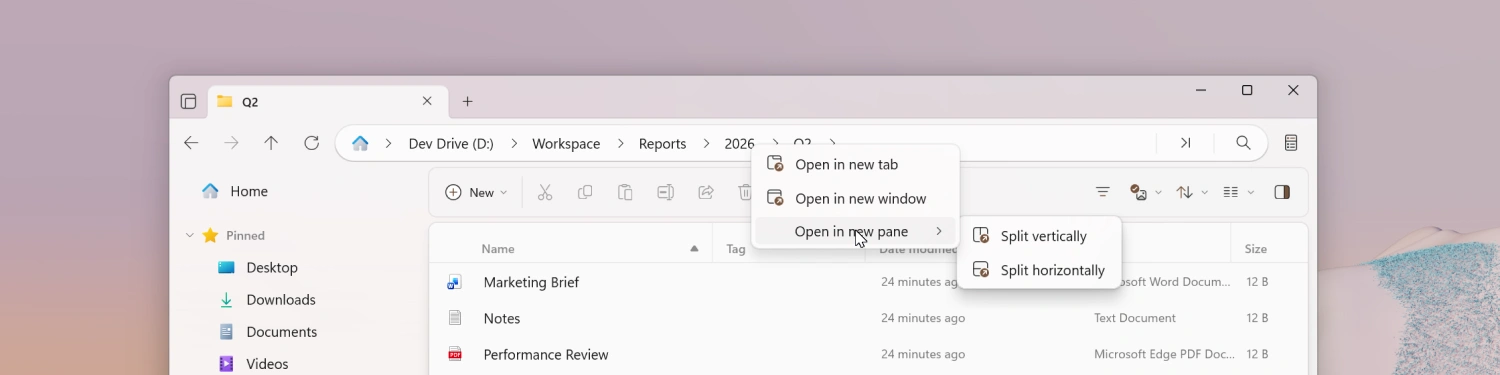
- Right-clicking a breadcrumb now shows context menu options to open the folder in a new tab, new window, or new pane.
Search in Toolbar Customization
The Toolbar Customization window now includes a search box that filters the list of available items as you type, making it easier to find a specific action when you are customizing the toolbar.
To open Toolbar Customization, right-click the toolbar and select Customize toolbar.
Cycle layouts with the scroll wheel
Ctrl + scroll on the file area already resizes items within the current layout. Starting with this release, once you reach the smallest or largest size, continuing to scroll now advances to the nextZaloguj lub Zarejestruj się aby zobaczyć!instead of stopping, letting you move between all layouts.
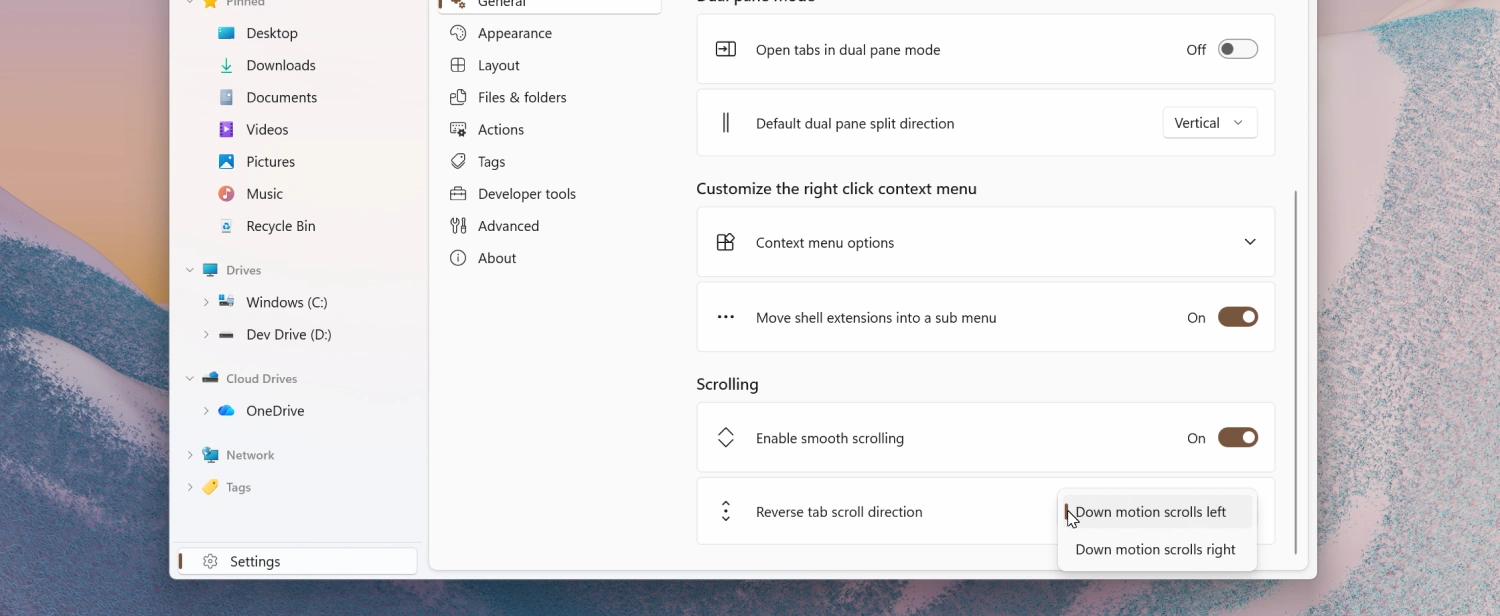
Reverse tab scroll direction
A new setting underZaloguj lub Zarejestruj się aby zobaczyć!lets you reverse the tab scroll direction when using the mouse wheel over the tab bar.
Improved tab tear off
When you drag a tab out of the tab bar to create a new window, the new window now opens at the position where you dropped the tab.
Improved continue where you left off
The startup behavior forZaloguj lub Zarejestruj się aby zobaczyć!has been improved so that previously opened tabs are restored more reliably and in the correct order across sessions.
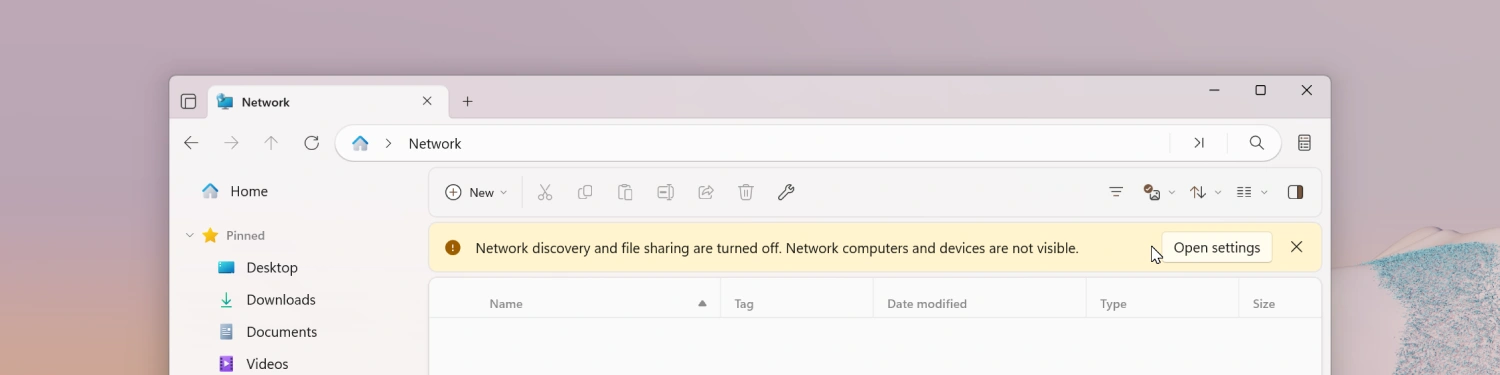
Network Discovery banner
When Network Discovery is turned off in Windows, Files now displays a banner in the Network page letting you know that some network locations may not appear.
Other highlights
- Items inside the Windows Fonts folder now show proper thumbnails, so you can preview a font’s appearance directly from the file list.
- Creating a new archive now automatically selects it.
- The File In Use dialog now includes a Skip button.
Fixes
- Fixed an issue where the
Zaloguj lub Zarejestruj się aby zobaczyć!would sometimes show duplicate entries.- Fixed an issue where focusing a pane via the
Zaloguj lub Zarejestruj się aby zobaczyć!didn’t work as expected.- Fixed an issue where drag and hover behavior didn’t work correctly in the sidebar.
- Fixed an issue where the shortcut overlay icon was rendered too large.
- Fixed an issue where the Open with option appeared in the context menu when multiple items were selected.
- Fixed an issue where right-clicking a folder in Columns View would open it.
- Fixed an issue where opening shell flyouts sometimes closed the context menu.
- Fixed an issue where the Omnibar would sometimes lose focus.
- Fixed an issue where launching Files from the command line didn’t work correctly in some scenarios.
- Fixed an issue where keyboard shortcuts didn’t work on the Release Notes page.
- Fixed an issue where toolbar buttons were sometimes missing.
- Fixed an issue with keyboard focus in
Zaloguj lub Zarejestruj się aby zobaczyć!.- Fixed an issue where archives weren’t displayed in the Recent Files widget.
- Fixed an issue where a pinned library didn’t display correctly in the sidebar.
- Fixed an issue where shortcuts weren’t displayed in search results.
- Updated status bar design:
- The status bar at the bottom of the window has been redesigned for a cleaner, more modern look that fits in better with the rest of the app.
- Toggle states for toolbar buttons:
- Toolbar buttons that turn an option on or off now show a clear toggle state, making it easier to see at a glance which options are currently active.
- Convert images to icons for folder icons:
- When choosing a custom icon in a folder’s Properties, you can now select a .png image and Files will automatically convert it to an .ico file for you.
- Choose an encoding when browsing archives:
- Files now lets you pick the encoding when browsing archives whose filenames aren’t stored in UTF-8, so items inside ZIP archives created on other systems display with the correct names.
- Fixes:
- Fixed an issue where the permanently delete checkbox was not shown in the delete dialog.
What’s New in Files v4.2.9
Improved navigation performance
Navigating between folders is now faster and more responsive.
Fixes
- Fixed an issue where pressing Alt+Enter to open the Properties window played an error sound.
- Fixed an issue where opening folder shortcuts didn’t work when Files was set as the default file manager.
- Fixed an issue with copying text from the rename text box.
- Fixed an issue where context menu primary commands were sometimes placed on the wrong end of the menu.
- Fixed an issue with disabled BitLocker items in the drive root background menu.
Conclusion
As always, we appreciate your feedback and suggestions on how to improve Files. You can reach us onZaloguj lub Zarejestruj się aby zobaczyć!and onZaloguj lub Zarejestruj się aby zobaczyć!.
Thank you for using Files!


